How to create HTML Form.

What is form in HTML
Form are what we use to collect information from the users for example: Login page, signup page etc.Form is very important in a website to give expressions of the users to the developer for example: Message me. Message me will help the users to interact with the developer.
Processes which form can be created.
We have tags to creaa form in HTML. Go to your visual studio code and go your file and. These is tags to open a form
<form>


</form>
This is use to tell the browser you are creating a form. After that you can now put your:
<Input type=""
The quotation marks Is to let the browser know what you want to be there like Email,Name, password. After that you put what we call placeholder.
<Input type="email" placeholder="email">
There should be a space between the input type and placeholder.whatever you put in your placeholder will display inside your form colum like this:
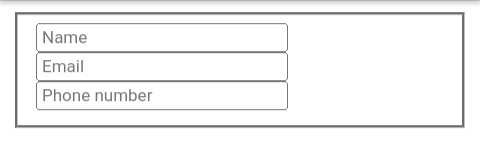
You can add a line round the form as seen above,and the code is going to be like this using fieldset
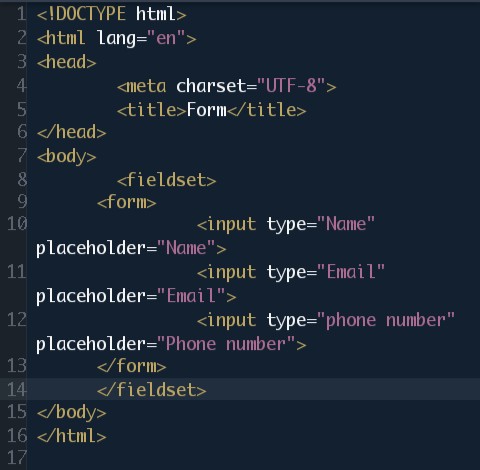
And we can also add HTML color like this:
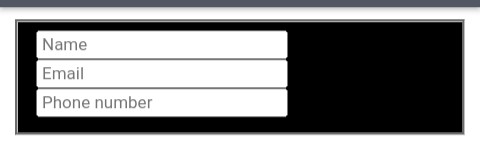
<form style="background: black; color: white">
And this will be the output:
 And one more thing let's make the line radius like this
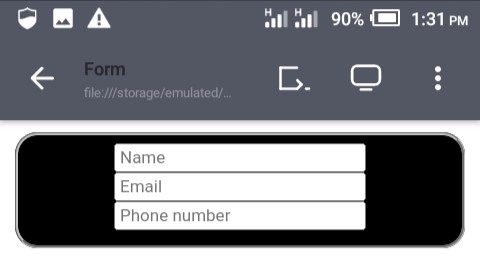
<form style="background: black; color: white; border-radius: 15px">
And the output will be like this
 This is a form.
Conclusion
I hope you enjoy this article on form stay tune and follow me to see more of my article.